MEXC Futures Take-Profit and Stop-Loss FAQMEXC Futures Take-Profit and Stop-Loss FAQ
Category List
Cancel

MEXC Futures Take-Profit and Stop-Loss FAQ

1. Understanding the basics of take-profit and stop-loss


1.1 What is take-profit and stop-loss?


Take-profit and stop-loss are core risk management tools in MEXC Futures trading. By setting trigger prices in advance, positions can be closed automatically when the market reaches your target levels.

Take Profit (TP): When the price reaches your preset profit target, the system automatically closes the position to lock in gains and prevent profit retracement. For example, if you open a BTC long position at 60,000 USDT and set the take-profit price at 69,000 USDT, the system will automatically close the position once the market rises to that level, helping secure a 15% return.

Stop Loss (SL): When the price falls below your preset defense line, the system automatically closes the position to limit losses and prevent further downside. For example, if you also open a BTC long position at 60,000 USDT and set the stop-loss price at 54,000 USDT, which is 10% below the entry price, the position will be closed automatically once the market drops to that level, keeping your loss within an acceptable range.

1.2 Why should I use take-profit and stop-loss?


In the crypto market, price swings can be sharp, and profits or losses can change in an instant. Using take-profit and stop-loss offers the following key benefits:
1) Lock in profits: Close positions in time when your target is reached, preventing gains from being given back due to greed.
2) Control risk: Cut losses quickly when the market moves against your expectations, helping preserve capital.
3) Reduce liquidation risk: Set stop-loss levels properly to avoid losing your entire margin.
4) Avoid emotional trading: Positions are closed automatically, reducing poor decisions caused by fear or greed.
5) No need to monitor the market constantly: Once set, the orders execute automatically, making them suitable for traders who cannot watch the market around the clock.

1.3 What types of take-profit and stop-loss does MEXC support?


MEXC offers multiple take-profit and stop-loss methods to suit different trading scenarios:

1) Set TP/SL before opening a position: You can set take-profit and stop-loss before placing an opening order. Trigger conditions can be preset by trigger price or by PNL rate or amount. Once the order is filled, the system immediately places the corresponding TP/SL order. Both market and limit TP/SL modes are supported.

2) Set TP/SL for an existing position: This applies to positions you already hold, including:
  • Entire Position TP/SL: Applies to the whole position, and the quantity adjusts automatically when you increase or reduce the position.
  • Partial Position TP/SL: Lets you set different TP/SL levels for part of a position, making staged take-profit strategies possible.

3) Take-profit reverse / stop-loss reverse: After take-profit or stop-loss is triggered, the system automatically opens a reverse position with the same quantity. This is suitable for quickly switching direction in trending markets.

1.4 What is the difference between TP/SL and a regular limit order?


A regular limit order is submitted to the market immediately and can be used to open or close a position. TP/SL is a conditional order that is activated and placed only when the market reaches the trigger price. TP/SL is more suitable for preset exit strategies and helps reduce the need to monitor the market constantly.

1.5 Can I set multiple take-profit and stop-loss orders at the same time?


Yes. By using the partial position TP/SL feature, you can set multiple different TP/SL levels for different portions of the same position to implement a staged take-profit strategy. This allows you to lock in part of your profits when the price reaches an initial target while keeping the remaining position open to capture a larger move.

2. TP/SL operation guide


2.1 How do I set take-profit and stop-loss when opening a position on MEXC?


Web: Open the MEXC websiteFutures → Select an order type such as Limit → Enter Price and Quantity → Check TP/SL → Click Advanced → Set Limit/Market TP/SLConfirm the parameters and open the position.


App: Open the MEXC App → Futures → Select an order type such as Limit Order → Enter Price and Quantity → Check TP/SL → Click Advanced → Set Limit/Market TP/SLConfirm the parameters and open the position.

2.2 How do I set take-profit and stop-loss for an existing position on MEXC?


Web: Open the MEXC websiteFutures → In the order section, go to Positions → Find the target position and click Add under take-profit/stop-loss → Set Limit/Market TP/SL.

App: Open the MEXC App → Futures → In the order section, go to Positions → Find the target position and tap Add under take-profit/stop-loss → Set Limit/Market TP/SL.

2.3 What is the difference between limit TP/SL and market TP/SL?


Limit TP/SL
Market TP/SL
Trigger mechanism
After being triggered, the system places a limit order at the preset price
After being triggered, the system closes the position immediately at the best available market price
Main advantage
Allows more precise control over the closing price
Fast execution and a much higher chance of being filled
Main drawback
In volatile markets, the order may not be filled
In volatile markets, the actual execution price may deviate from expectations due to slippage

Recommendation: If your priority is to ensure the position is closed, market mode is generally recommended. If you have strict requirements for the execution price and are willing to accept the risk of not being filled, you may choose limit mode.

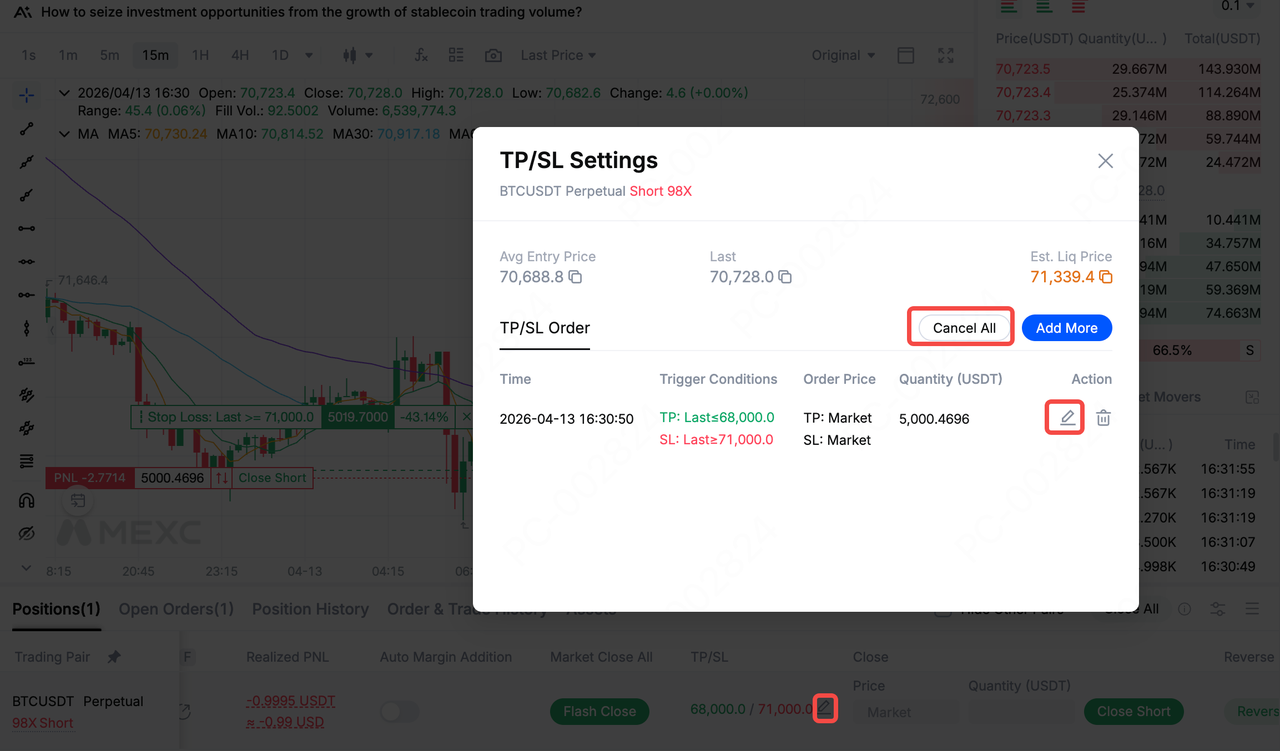
2.4 Can I still modify or cancel TP/SL after setting it?


Yes. You can find the order under Positions or Open Orders in the order section and modify or cancel any untriggered TP/SL order at any time. However, please note:
  • Once TP/SL is triggered and the order has been placed, it can no longer be canceled.
  • If the market moves quickly, the order may already have been triggered at the moment you try to modify it.
  • It is recommended to adjust your TP/SL in advance before key support or resistance levels are broken.

2.5 Will take-profit and stop-loss adjust automatically after I increase my position?


That depends on the type of TP/SL you are using:

Entire Position TP/SL: The quantity adjusts automatically when you increase the position, but the trigger price does not change. Example: You initially hold 1 BTC and set the take-profit price at 70,000 USDT. After increasing the position, you hold 2 BTC. The take-profit price remains 70,000 USDT, but the closing quantity automatically changes to 2 BTC.

Partial Position TP/SL: Neither the quantity nor the trigger price changes. After increasing the position, you need to manually set new TP/SL orders for the additional position size.

Order TP/SL: This is bound to a specific order and only applies to the position opened by that order fill. Increasing the position separately does not affect this TP/SL setting.

Important reminder: Increasing your position changes the average entry price, but the trigger prices of existing TP/SL orders are fixed at the time they are created and will not adjust automatically with the new average entry price. After increasing a position, it is recommended that you reassess and adjust your TP/SL strategy accordingly.

2.6 Will TP/SL orders occupy margin?


Before a TP/SL order is triggered, it does not lock or occupy margin. Margin is only locked once the order is triggered and actually placed. Although setting TP/SL does not affect the available funds for opening a new position, you still need to make sure your account has sufficient balance when the order is triggered.

3. Using TP/SL to optimize trading results


3.1 How should I set a stop-loss ratio properly?


It is recommended that you evaluate the following factors together:
1) Risk tolerance: Keep the loss on a single trade within 2% to 5% of your total funds.
2) Technical analysis: Place the stop-loss beyond key support or resistance levels.
3) Volatility of the asset:
  • For highly volatile tokens, a relatively wider stop-loss may help avoid being stopped out by normal price swings.
  • For less volatile tokens, a relatively tighter stop-loss may be more appropriate.
4) Leverage consideration: Higher leverage generally requires stricter stop-loss control.

3.2 How can I avoid having my stop-loss triggered too early?


It is common for the market to briefly touch a stop-loss level and then rebound quickly, causing the stop-loss to be triggered before the market resumes moving in the originally expected direction.

Ways to reduce this risk:
  • Avoid obvious price levels: Do not place stop-loss orders exactly at highly visible round numbers or obvious technical levels.
  • Use a reasonable price trigger: Choose a more suitable trigger price type instead of the last price to reduce the impact of abnormal price swings.
  • Leave room for volatility: Give your stop-loss enough space to account for normal market fluctuations.
  • Choose the right trading hours: Pay attention to market depth and avoid periods of poor liquidity.

3.3 How can I use the reverse feature for two-way trading?


MEXC's take-profit reverse and stop-loss reverse features can help traders switch direction quickly when the trend changes. After take-profit or stop-loss closes a position, the system automatically opens a reverse position with the same quantity.

Recommendations for use:
  • Use the reverse feature only when you have a clear view of the market direction.
  • Be aware that during extreme volatility, the reverse opening order may not be fully filled.
  • MEXC will notify you of the reverse result by email, SMS, and in-app message.
  • It is recommended that you set new TP/SL orders for the reversed position to control the risk of consecutive losses.


3.4 In what situations should I use stop-loss reverse?


Stop-loss reverse is suitable for the following scenarios:
  • You have clearly determined that the trend has reversed and want to follow the new direction quickly.
  • In trend trading, your original direction is stopped out and technical indicators show a reverse signal.
  • You are an experienced trader with sufficient risk tolerance.

Note: Reverse will open a new position immediately and carries relatively high risk. Beginners should use it with caution.

3.5 How can I implement a staged take-profit strategy?


Staged take-profit is a strategy commonly used by professional traders. It helps lock in part of the profit when the price reaches an initial target, while still allowing the remaining position to benefit from a larger-than-expected move. This can effectively reduce the regret of exiting too early.

How to do it: On MEXC, you can use the Partial Position take-profit feature. Set multiple take-profit levels for different parts of the same position to achieve step-by-step profit-taking.

4. Other common TP/SL questions


4.1 Why was my take-profit or stop-loss not filled?


TP/SL does not guarantee 100% execution. Trigger failure or execution deviation may occur for the following reasons:
  • Limit mode issue: The market may move past your limit price too quickly, causing the order not to be filled.
  • Insufficient liquidity: There may not be enough counterparties at your desired price.
  • Insufficient margin: Your available balance may not be enough to cover fees or maintenance margin.
  • Futures trading suspension: The contract may be under maintenance or temporarily suspended from trading.
  • Recommendation: To improve the chance of execution, consider using market mode or trading mainstream pairs with stronger liquidity.

4.2 Will TP/SL orders incur fees?


Yes. Once triggered, TP/SL orders are executed as normal market or limit orders, so the corresponding trading fees apply. You can view detailed rates on the MEXC Fee Overview.


4.3 How can I help ensure TP/SL executes effectively at critical moments?


To help ensure your TP/SL executes effectively at key moments, it is recommended that you keep the following in mind:
  • Prioritize market mode: Use market TP/SL at important price levels to improve execution certainty.
  • Maintain sufficient balance: Make sure your account has enough available margin and fee balance.
  • Trade highly liquid pairs: Trading mainstream pairs can reduce slippage caused by poor liquidity.
  • Avoid extreme market conditions: Be cautious when setting TP/SL during major news events or periods of intense volatility.
  • Check orders regularly: Review Open Orders regularly to confirm that your TP/SL order status is normal.

4.4 How should multiple TP/SL orders be managed together?


When you set multiple TP/SL orders for the same position, pay attention to the following:
  • Quantity balance: Make sure the total quantity of all TP/SL orders does not exceed the current position size.
  • Price laddering: Set reasonable price intervals so that trigger prices are not too close to each other.
  • Priority planning: Be clear about which orders are core stop-loss orders for capital protection and which are take-profit orders for locking in gains.
  • Timely adjustments: After some orders are executed, adjust the prices and quantities of the remaining orders in time.

4.5 What are the most common mistakes when setting TP/SL?


  • Stop-loss set too tight: It may be triggered by normal price fluctuations, causing an early exit.
  • Stop-loss set too loose: Risk exposure becomes too large, and the loss on a single trade may exceed your tolerance.
  • Ignoring fees: Trading fees are not taken into account, so actual PNL differs from expectations.
  • Unrealistic take-profit targets: Profit targets are set too high, causing orders to remain unfilled for a long time.
  • Failure to adjust in time: The market environment changes, but the TP/SL strategy is not updated accordingly.
  • Blindly using reverse: Using the reverse feature in an unclear market may add unnecessary risk.


MEXC Futures Take-Profit and Stop-Loss FAQ

1. Understanding the basics of take-profit and stop-loss


1.1 What is take-profit and stop-loss?


Take-profit and stop-loss are core risk management tools in MEXC Futures trading. By setting trigger prices in advance, positions can be closed automatically when the market reaches your target levels.

Take Profit (TP): When the price reaches your preset profit target, the system automatically closes the position to lock in gains and prevent profit retracement. For example, if you open a BTC long position at 60,000 USDT and set the take-profit price at 69,000 USDT, the system will automatically close the position once the market rises to that level, helping secure a 15% return.

Stop Loss (SL): When the price falls below your preset defense line, the system automatically closes the position to limit losses and prevent further downside. For example, if you also open a BTC long position at 60,000 USDT and set the stop-loss price at 54,000 USDT, which is 10% below the entry price, the position will be closed automatically once the market drops to that level, keeping your loss within an acceptable range.

1.2 Why should I use take-profit and stop-loss?


In the crypto market, price swings can be sharp, and profits or losses can change in an instant. Using take-profit and stop-loss offers the following key benefits:
1) Lock in profits: Close positions in time when your target is reached, preventing gains from being given back due to greed.
2) Control risk: Cut losses quickly when the market moves against your expectations, helping preserve capital.
3) Reduce liquidation risk: Set stop-loss levels properly to avoid losing your entire margin.
4) Avoid emotional trading: Positions are closed automatically, reducing poor decisions caused by fear or greed.
5) No need to monitor the market constantly: Once set, the orders execute automatically, making them suitable for traders who cannot watch the market around the clock.

1.3 What types of take-profit and stop-loss does MEXC support?


MEXC offers multiple take-profit and stop-loss methods to suit different trading scenarios:

1) Set TP/SL before opening a position: You can set take-profit and stop-loss before placing an opening order. Trigger conditions can be preset by trigger price or by PNL rate or amount. Once the order is filled, the system immediately places the corresponding TP/SL order. Both market and limit TP/SL modes are supported.

2) Set TP/SL for an existing position: This applies to positions you already hold, including:
  • Entire Position TP/SL: Applies to the whole position, and the quantity adjusts automatically when you increase or reduce the position.
  • Partial Position TP/SL: Lets you set different TP/SL levels for part of a position, making staged take-profit strategies possible.

3) Take-profit reverse / stop-loss reverse: After take-profit or stop-loss is triggered, the system automatically opens a reverse position with the same quantity. This is suitable for quickly switching direction in trending markets.

1.4 What is the difference between TP/SL and a regular limit order?


A regular limit order is submitted to the market immediately and can be used to open or close a position. TP/SL is a conditional order that is activated and placed only when the market reaches the trigger price. TP/SL is more suitable for preset exit strategies and helps reduce the need to monitor the market constantly.

1.5 Can I set multiple take-profit and stop-loss orders at the same time?


Yes. By using the partial position TP/SL feature, you can set multiple different TP/SL levels for different portions of the same position to implement a staged take-profit strategy. This allows you to lock in part of your profits when the price reaches an initial target while keeping the remaining position open to capture a larger move.

2. TP/SL operation guide


2.1 How do I set take-profit and stop-loss when opening a position on MEXC?


Web: Open the MEXC websiteFutures → Select an order type such as Limit → Enter Price and Quantity → Check TP/SL → Click Advanced → Set Limit/Market TP/SLConfirm the parameters and open the position.


App: Open the MEXC App → Futures → Select an order type such as Limit Order → Enter Price and Quantity → Check TP/SL → Click Advanced → Set Limit/Market TP/SLConfirm the parameters and open the position.

2.2 How do I set take-profit and stop-loss for an existing position on MEXC?


Web: Open the MEXC websiteFutures → In the order section, go to Positions → Find the target position and click Add under take-profit/stop-loss → Set Limit/Market TP/SL.

App: Open the MEXC App → Futures → In the order section, go to Positions → Find the target position and tap Add under take-profit/stop-loss → Set Limit/Market TP/SL.

2.3 What is the difference between limit TP/SL and market TP/SL?


Limit TP/SL
Market TP/SL
Trigger mechanism
After being triggered, the system places a limit order at the preset price
After being triggered, the system closes the position immediately at the best available market price
Main advantage
Allows more precise control over the closing price
Fast execution and a much higher chance of being filled
Main drawback
In volatile markets, the order may not be filled
In volatile markets, the actual execution price may deviate from expectations due to slippage

Recommendation: If your priority is to ensure the position is closed, market mode is generally recommended. If you have strict requirements for the execution price and are willing to accept the risk of not being filled, you may choose limit mode.

2.4 Can I still modify or cancel TP/SL after setting it?


Yes. You can find the order under Positions or Open Orders in the order section and modify or cancel any untriggered TP/SL order at any time. However, please note:
  • Once TP/SL is triggered and the order has been placed, it can no longer be canceled.
  • If the market moves quickly, the order may already have been triggered at the moment you try to modify it.
  • It is recommended to adjust your TP/SL in advance before key support or resistance levels are broken.


2.5 Will take-profit and stop-loss adjust automatically after I increase my position?


That depends on the type of TP/SL you are using:

Entire Position TP/SL: The quantity adjusts automatically when you increase the position, but the trigger price does not change. Example: You initially hold 1 BTC and set the take-profit price at 70,000 USDT. After increasing the position, you hold 2 BTC. The take-profit price remains 70,000 USDT, but the closing quantity automatically changes to 2 BTC.

Partial Position TP/SL: Neither the quantity nor the trigger price changes. After increasing the position, you need to manually set new TP/SL orders for the additional position size.

Order TP/SL: This is bound to a specific order and only applies to the position opened by that order fill. Increasing the position separately does not affect this TP/SL setting.

Important reminder: Increasing your position changes the average entry price, but the trigger prices of existing TP/SL orders are fixed at the time they are created and will not adjust automatically with the new average entry price. After increasing a position, it is recommended that you reassess and adjust your TP/SL strategy accordingly.

2.6 Will TP/SL orders occupy margin?


Before a TP/SL order is triggered, it does not lock or occupy margin. Margin is only locked once the order is triggered and actually placed. Although setting TP/SL does not affect the available funds for opening a new position, you still need to make sure your account has sufficient balance when the order is triggered.

3. Using TP/SL to optimize trading results


3.1 How should I set a stop-loss ratio properly?


It is recommended that you evaluate the following factors together:
1) Risk tolerance: Keep the loss on a single trade within 2% to 5% of your total funds.
2) Technical analysis: Place the stop-loss beyond key support or resistance levels.
3) Volatility of the asset:
  • For highly volatile tokens, a relatively wider stop-loss may help avoid being stopped out by normal price swings.
  • For less volatile tokens, a relatively tighter stop-loss may be more appropriate.
4) Leverage consideration: Higher leverage generally requires stricter stop-loss control.

3.2 How can I avoid having my stop-loss triggered too early?


It is common for the market to briefly touch a stop-loss level and then rebound quickly, causing the stop-loss to be triggered before the market resumes moving in the originally expected direction.

Ways to reduce this risk:
  • Avoid obvious price levels: Do not place stop-loss orders exactly at highly visible round numbers or obvious technical levels.
  • Use a reasonable price trigger: Choose a more suitable trigger price type instead of the last price to reduce the impact of abnormal price swings.
  • Leave room for volatility: Give your stop-loss enough space to account for normal market fluctuations.
  • Choose the right trading hours: Pay attention to market depth and avoid periods of poor liquidity.

3.3 How can I use the reverse feature for two-way trading?


MEXC's take-profit reverse and stop-loss reverse features can help traders switch direction quickly when the trend changes. After take-profit or stop-loss closes a position, the system automatically opens a reverse position with the same quantity.

Recommendations for use:
  • Use the reverse feature only when you have a clear view of the market direction.
  • Be aware that during extreme volatility, the reverse opening order may not be fully filled.
  • MEXC will notify you of the reverse result by email, SMS, and in-app message.
  • It is recommended that you set new TP/SL orders for the reversed position to control the risk of consecutive losses.


3.4 In what situations should I use stop-loss reverse?


Stop-loss reverse is suitable for the following scenarios:
  • You have clearly determined that the trend has reversed and want to follow the new direction quickly.
  • In trend trading, your original direction is stopped out and technical indicators show a reverse signal.
  • You are an experienced trader with sufficient risk tolerance.

Note: Reverse will open a new position immediately and carries relatively high risk. Beginners should use it with caution.

3.5 How can I implement a staged take-profit strategy?


Staged take-profit is a strategy commonly used by professional traders. It helps lock in part of the profit when the price reaches an initial target, while still allowing the remaining position to benefit from a larger-than-expected move. This can effectively reduce the regret of exiting too early.

How to do it: On MEXC, you can use the Partial Position take-profit feature. Set multiple take-profit levels for different parts of the same position to achieve step-by-step profit-taking.

4. Other common TP/SL questions


4.1 Why was my take-profit or stop-loss not filled?


TP/SL does not guarantee 100% execution. Trigger failure or execution deviation may occur for the following reasons:
  • Limit mode issue: The market may move past your limit price too quickly, causing the order not to be filled.
  • Insufficient liquidity: There may not be enough counterparties at your desired price.
  • Insufficient margin: Your available balance may not be enough to cover fees or maintenance margin.
  • Futures trading suspension: The contract may be under maintenance or temporarily suspended from trading.
  • Recommendation: To improve the chance of execution, consider using market mode or trading mainstream pairs with stronger liquidity.

4.2 Will TP/SL orders incur fees?


Yes. Once triggered, TP/SL orders are executed as normal market or limit orders, so the corresponding trading fees apply. You can view detailed rates on the MEXC Fee Overview.


4.3 How can I help ensure TP/SL executes effectively at critical moments?


To help ensure your TP/SL executes effectively at key moments, it is recommended that you keep the following in mind:
  • Prioritize market mode: Use market TP/SL at important price levels to improve execution certainty.
  • Maintain sufficient balance: Make sure your account has enough available margin and fee balance.
  • Trade highly liquid pairs: Trading mainstream pairs can reduce slippage caused by poor liquidity.
  • Avoid extreme market conditions: Be cautious when setting TP/SL during major news events or periods of intense volatility.
  • Check orders regularly: Review Open Orders regularly to confirm that your TP/SL order status is normal.

4.4 How should multiple TP/SL orders be managed together?


When you set multiple TP/SL orders for the same position, pay attention to the following:
  • Quantity balance: Make sure the total quantity of all TP/SL orders does not exceed the current position size.
  • Price laddering: Set reasonable price intervals so that trigger prices are not too close to each other.
  • Priority planning: Be clear about which orders are core stop-loss orders for capital protection and which are take-profit orders for locking in gains.
  • Timely adjustments: After some orders are executed, adjust the prices and quantities of the remaining orders in time.

4.5 What are the most common mistakes when setting TP/SL?


  • Stop-loss set too tight: It may be triggered by normal price fluctuations, causing an early exit.
  • Stop-loss set too loose: Risk exposure becomes too large, and the loss on a single trade may exceed your tolerance.
  • Ignoring fees: Trading fees are not taken into account, so actual PNL differs from expectations.
  • Unrealistic take-profit targets: Profit targets are set too high, causing orders to remain unfilled for a long time.
  • Failure to adjust in time: The market environment changes, but the TP/SL strategy is not updated accordingly.
  • Blindly using reverse: Using the reverse feature in an unclear market may add unnecessary risk.